
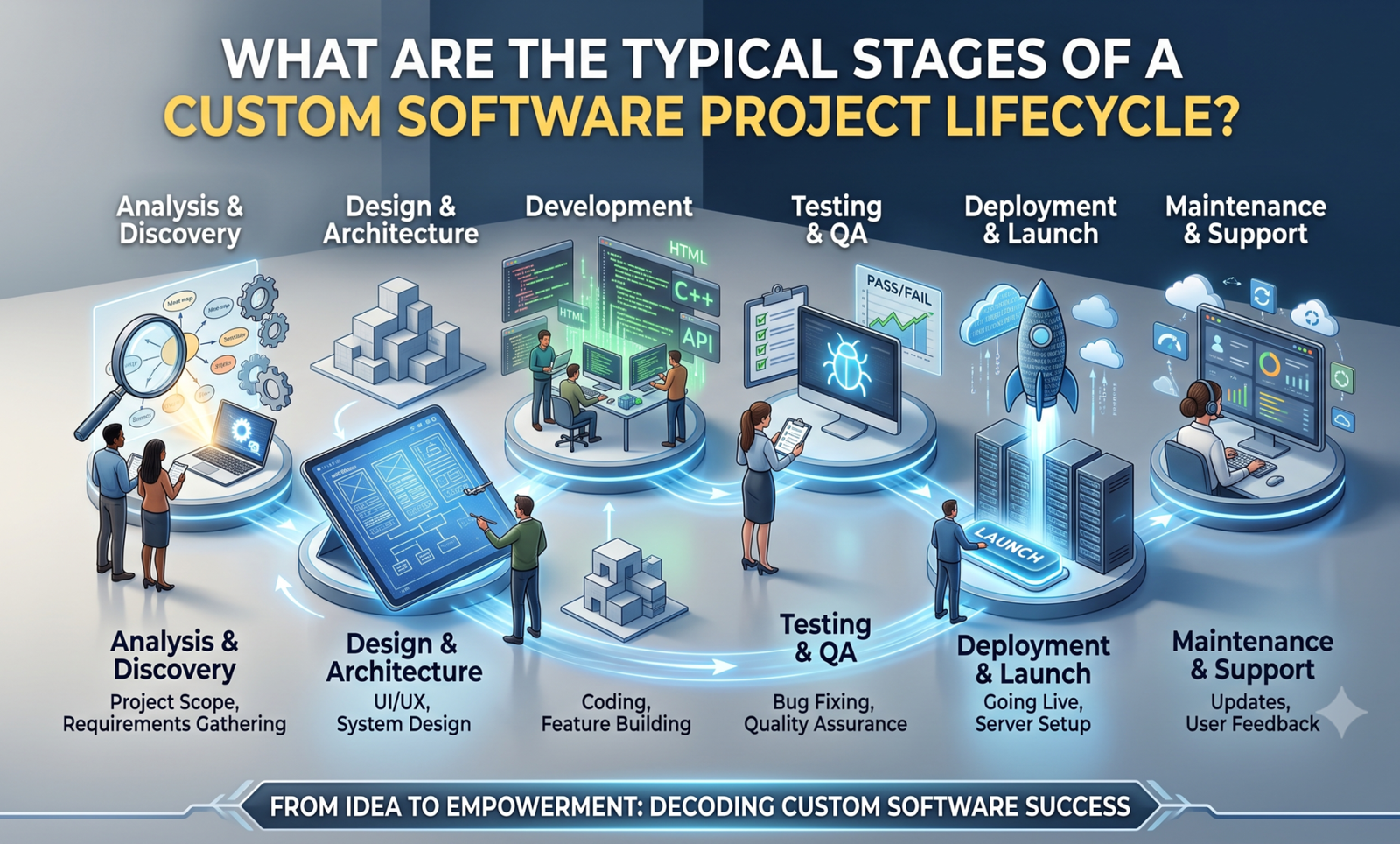
You’ve decided off-the-shelf tools aren’t cutting it anymore, and you’re ready to talk to a custom software development company. Okay, but it’s important to understand what you’re really signing up for before you sign anything. A custom build goes through a predetermined series of steps, each with its own choices, risks, and checkpoints where things frequently go wrong. It is not a single deliverable that arrives in your inbox one day.
We’ve gone through this process enough times at Wantik Technologies to know where projects typically stall: unclear requirements, a hurried design phase to “save time,” or a launch that forgoes adequate testing due to an impending deadline. The seven steps that any custom software project actually goes through are described in this article, along with what to look out for at each level.
Stage 1: Discovery and Requirements Gathering
People are more tempted to hurry at this phase, which also decides whether or not everything proceeds as planned.
Discovery is more than just one meeting where you pitch your idea to a developer and get their approval. When done correctly, it entails multiple meetings with the real users of the program, not simply the executive who approved the budget. A logistics company we worked with in Jebel Ali thought they needed a simple dispatch tracker; three discovery sessions later, it turned out the real bottleneck was how dispatchers reconciled fuel receipts against trip logs by hand. The program they ultimately developed was different from what they had first requested, and it resolved the issue that had really cost them money.
At this point, a capable team is enquiring:
-
- What issue is this resolving, and how is it currently being addressed (using spreadsheets, a legacy system, or manual processes)?
-
- Who are the real end users and how comfortable are they with technology?
-
- Which current systems, your accounting program, a payment gateway, or a CRM, does this need to communicate with?
-
- What distinguishes nice-to-haves from non-negotiables?
Instead of a verbal understanding, the outcome should be a written requirements document. It is worthwhile to enquire if a vendor wishes to proceed directly to a proposal without doing this.
Stage 2: Planning, Scoping, and Choosing an Approach
Once you know what you’re building, the next question is how, and how much it’ll cost and take.
This is where scope gets defined properly, usually broken into a minimum viable product (MVP) and a longer list of features for later phases. It’s tempting to want everything in version one, but a phased approach gets something usable in front of real users faster, and lets you course-correct before you’ve spent the full budget on features nobody ends up needing.
The development methodology is also settled at this stage. Instead of using a strict Waterfall model where nothing is visible until the very end, the majority of teams in modern custom software development companies operate in Agile sprints, working in two-to four-week cycles with frequent check-ins. Agile is more than just a catchphrase in this context; it implies you won’t have to wait four months to see if the final result is what you had in mind. A more organised Waterfall or hybrid approach may still be appropriate for projects with highly specific, well-defined objectives (certain compliance-driven systems, for example). How much the requirements are likely to change after actual users become engaged will determine the appropriate decision.
You should walk away from this stage with a project timeline, a cost estimate broken down by phase, and a clear list of what’s in the MVP versus what’s deferred.
Stage 3: UI/UX Design and Technical Architecture
Two things happen in parallel here, and both matter more than most clients expect.
Before creating a single line of production code, we develop wireframes, higher-fidelity prototypes, and test them with actual users. This insurance is less expensive than it might seem because it just takes a few days to rewrite a complicated workflow in a clickable prototype, but it takes weeks to do so once development is complete. This is also where local user expectations and multilingual interface requirements (Arabic and English, including right-to-left layout compatibility) are integrated from the beginning rather than added after the fact for any company operating in the United Arab Emirates.
Technically speaking, architects make the fundamental decisions that are difficult to undo later, such as which programming languages and frameworks are appropriate for the task, how the database is organised, whether it is built on-premises or in the cloud, and how it will expand if usage triples in the second year. This is also where security architecture and data protection regulations, such as UAE PDPL compliance, are incorporated, rather than added after a launch, for companies that handle consumer data.
One of the more costly errors we observe is skipping or hurrying this step. When the system needs to grow, and the underlying structure is unable to support it without an expensive rebuild, a weak architecture typically breaks the software eighteen months later.
Stage 4: Development
This is the stage most people picture when they think of “building software”, and it’s usually the longest one, though not necessarily the riskiest, if the earlier stages were done properly.
Developers work through the sprint cycles defined in planning, building features incrementally rather than disappearing for months and reappearing with a finished product. You should be seeing working increments regularly: a functioning login flow, then a working dashboard, then integrated reporting, not just status updates in a meeting. This regular visibility is what actually lets you catch a misunderstanding early, while it’s a small fix, instead of at the end, when it’s a rebuild.
Good practice here also includes code reviews, version control, and documentation as the product is built, not retrofitted at the end because a client asked for it. If you ever need to bring in a different developer or team later, undocumented code makes that far more expensive than it needs to be.
Stage 5: Testing and Quality Assurance
Testing isn’t a single pass at the end, it should be happening throughout development, but it intensifies into its own dedicated phase before launch.
This typically covers several layers: functional testing (does each feature do what it’s supposed to), integration testing (do the pieces work together, your new system talking to your existing payment processor or accounting platform, for example), performance testing (does it hold up under real load, not just a demo with three users), security testing, and finally user acceptance testing (UAT), where the actual people who’ll use the software daily try to break it before it goes live.
UAT is the step that gets compressed most often when timelines slip, and it’s the one that shouldn’t be. A bug caught by your QA team costs a fix. The same bug caught by a customer after launch costs a fix, an apology, and sometimes a lost customer.
Stage 6: Deployment and Go-Live
Launch day looks simple from the outside, the software goes live, but there’s real groundwork behind it: setting up production infrastructure, migrating existing data without losing or corrupting it, configuring backups, and often running a soft launch with a small user group before a full rollout.
If you’re replacing an existing system, data migration needs special consideration. Accurately transferring years’ worth of customer records, transaction history, or inventory data is often underestimated in terms of both time and complexity. One of the most frequent reasons for a difficult launch week is a hurried relocation.
Stage 7: Post-Launch Support, Maintenance, and Growth
Here’s what a lot of first-time buyers get wrong: they treat launch as the finish line. It isn’t. It’s closer to the starting line for the software’s actual working life.
Once real users are in the system, you’ll get feedback that no amount of discovery work could have predicted, plus bugs that only surface under real-world conditions. There are security patches to apply, operating system and dependency updates to keep pace with, and, if the software is doing its job, new feature requests as your business grows and the software needs to grow with it.
This is also the point at which picking an experienced partner truly pays off. A team that built your system and is familiar with its architecture can resolve problems and deliver improvements far more quickly than someone who is just viewing your codebase for the first time. Rather than re-tendering the work every time something needs to be updated, it’s one of the more obvious reasons why companies typically keep with the same development partner throughout the software’s lifetime.
Conclusion
A custom software project goes through several stages, including discovery, planning, design and architecture, development, testing, deployment, and ongoing support. If any of these steps are skipped or rushed, it usually results in costs later on, such as a missed requirement, a security flaw, or a system that isn’t scalable when you need it to.
When assessing a custom software development company in Dubai for a future project, find out exactly how they manage each of these phases, not just what they’ll create, but how they’ll get there. Because software that truly fits your business requires more than just good code, it requires a methodology designed to identify issues before they become costly ones, we at Wantik Technologies guide each client through this process from the initial discovery meeting to long beyond launch.
Are you considering a custom software project and would like a better idea of its scope and cost before committing? Get in contact with the Wantik Technologies team for a straightforward discussion about what your project will truly entail. There is no commitment.
Related Reading: Custom Web Application Development Company vs. Off-the-Shelf Templates: The Scalability Debate