AI App Development for UAE Healthcare: Use Cases and Compliance

AI App Development for UAE Healthcare: Use Cases and Compliance

AI App Development for UAE Healthcare: Use Cases and ComplianceIf you ask someone who has spent an evening in a packed clinic in Dubai what’s wrong with healthcare, they won’t respond, “not enough technology.” They’ll complain that the doctor appears worn out, the paperwork never stops, and the wait is excessively lengthy. The real opportunity for AI app development in UAE healthcare is to free doctors from time-consuming, repetitive tasks rather than replace them.

Can it be done well here? Yes. However, the apps that end up in actual hospitals have one thing in common: they were created with UAE regulations in mind from the very beginning, rather than being fixed before release. Patient consent must be obtained appropriately, health data must typically remain within the nation, and each emirate has its own regulator and standards. If you don’t do that preparation, you’ll have a nice demo that no one can utilise.

We go over where AI is making an impact, what the compliance side entails, and how to steer clear of the most typical blunders below.

Why the UAE Is Such a Good Place to Build This

For some time now, the UAE has taken AI seriously. Abu Dhabi and Dubai have both released guidelines regarding the application of AI in healthcare. There is also the plumbing. Patient records are more integrated in Dubai than in many other markets because of the NABIDH health information exchange and Malaffi in Abu Dhabi.

This is important since the usefulness of an AI tool depends on the data it can access.

Building for it is similarly challenging. More than 200 different nationalities make up the patient population. While the patient recounts their symptoms in Arabic, Urdu, Hindi, or Tagalog, the doctor may chart in English. Insurance sits behind almost every visit. Therefore, AI app development in Dubai rarely entails taking a product that was created in the US or the UK and changing the currency. The way it must function is altered by the local specifics.

Use Cases Worth Your Budget

Plenty of AI ideas sound brilliant in a boardroom and fall flat on a ward. These are the ones that tend to hold up.

Reading scans faster

Radiologists can prioritise urgent patients by using computer vision to identify worrisome spots on X-rays, CT scans, and eye images. Support is the key term. The good tools leave the decision to the physician and present the AI’s findings as a second opinion with a confidence level. It’s not only excellent design. As we’ll discuss later, it also affects how a regulator will categorise your program.

Triage before the appointment

An assistant can ask a patient a few sensible questions ahead of a visit, suggest the right specialty, and give the doctor a summary. It sounds simple, but it’s easy to get wrong. People don’t describe pain in textbook terms; many will want to type in Arabic, and the tool has to know when to stop and say “please see someone now.”

Forecasting what the hospital will need

No-shows, bed occupancy, readmission risk, and emergency department surges can all be predicted using historical data. These tools have less regulatory weight because they don’t deal with diagnosis, and they frequently pay for themselves through improved scheduling.

Supporting patients with long-term conditions

Diabetes and heart disease are major health priorities in the UAE. An app can identify issues before they become admissions by reading data from a glucose monitor or smartwatch, prompting the patient when appropriate, and alerting the care team when values start to slip.

The boring stuff that saves the most money

Medical coding, prior authorisations, claim checks, note transcription. Nobody puts these on a conference slide, but this is often where clinics see the fastest return. Claims in Abu Dhabi go through Shafafiya and in Dubai through eClaimLink, so integrating with those platforms is a big part of the value. Cut the rejection rate and the finance team will notice quickly.

Getting Your Head Around UAE Healthcare AI Compliance

This is where projects live or die, and the difficulty is that the rules come in layers that overlap.

At the federal level, the main one is Federal Law No. 2 of 2019 on the use of ICT in health fields, usually called the ICT Health Law. It covers how health data is collected, stored, and shared. The part that catches most teams out is data localisation: health data generally must be stored and processed inside the UAE, with limited exceptions set out in later ministerial decisions. It also sets long minimum retention periods for health records. Alongside it sits the Personal Data Protection Law (Federal Decree-Law No. 45 of 2021), which treats health information as sensitive personal data and raises the bar on consent and security.

Then each emirate adds its own layer:

    • Dubai Health Authority (DHA): publishes a policy on AI in healthcare and sets the rules for connecting to NABIDH.

    • Department of Health, Abu Dhabi (DoH): has its own AI policy, the ADHICS cybersecurity standard, and expects Malaffi integration.

    • MOHAP: the federal Ministry of Health and Prevention, which oversees the northern emirates and federal-level matters.

One more thing to settle early: whether your software counts as a medical device. If it influences diagnosis or treatment, it may need to be registered before clinical use. It depends on what the feature is meant to do, so ask the question in week one, not after launch.

A fair warning. This area moves quickly, and policies get revised. Treat this article as a map, not legal advice, and check the current position with the relevant authority and a UAE healthcare lawyer before you build or go live.

Building Compliance In From the Start

Teams prefer to regard compliance as a checklist. Successful ones approach it as a design constraint, much like screen size or budget. In reality, that entails a few routines.

Keep the data here. Use on-site hosting or cloud regions located in the United Arab Emirates. Additionally, you can set limits. You can be in violation without realising it if a third-party API quietly transmits identifying patient data overseas. A locally hosted model is frequently the safer option for anything involving actual patient records.

Collect only what you need. Every extra data field is extra risk. Where you can, train and test on anonymised data.

Make consent understandable. Patients should be told in plain language, ideally their own words, how their data will be used. It should be recorded and easy to withdraw.

Leave the doctor in charge. For clinical features, build a clear way to override the AI and keep a log of what it suggested and what the clinician chose.

Check for bias. Many models are trained mostly on Western data and can be less accurate for Middle Eastern and South Asian patients. Test on data that looks like your actual users.

Take security seriously. Encryption, role-based access, penetration testing, and proper logging are the baseline. ADHICS spells much of this out for Abu Dhabi providers.

Choosing the Right Development Partner

If you’re comparing teams for AI app development in Dubai, don’t be won over by the demo. Demos are easy to polish. Better to ask:

    • Have they built against NABIDH, Malaffi, or the e-claim platforms before?

    • Can they tell you exactly where your data will sit and which models will touch it?

    • Do they ask how your clinic actually runs before they suggest technology?

    • What happens after launch? Who watches for the model getting worse over time?

    • Will they tell you when AI isn’t the answer?

That last question is the one we’d weigh most heavily. Sometimes a cleaner workflow or a simple set of rules solves the problem faster, cheaper, and with far less regulatory baggage. A partner who admits that is worth keeping.

From Idea to Launch

Most projects that work follow a similar path.

    • Pick one problem and state it sharply. “Cut chest X-ray reporting time” is a project. “Use AI in our hospital” is a hope.

    • Sort out the regulatory route early. Is it clinical or administrative? Which authorities are involved?

    • Pilot in one department. Prove it works somewhere small before rolling it out.

    • Get clinicians involved from day one. If an app ignores how nurses and doctors really work, they’ll stop using it, however accurate the model is.

    • Keep watching after launch. Equipment, patient mix, and clinical practice all change, and models drift with them.

Conclusion

AI app development in the UAE has real potential, from quicker diagnostics to hospitals that run a bit more smoothly. The teams getting results aren’t the ones with the flashiest technology. They’re the ones who took compliance, clinical trust, and local context seriously from the beginning.

If you’re weighing up an AI healthcare product, Wantik Technologies can help you test whether the idea is feasible, map the regulations that apply to your use case, and build a pilot your clinicians will actually want to use. Talk to our team and tell us what you’re trying to solve.
AI App Development in Dubai: What Businesses Need to Know Before Investing

AI App Development in Dubai: What Businesses Need to Know Before Investing

AI App Development in Dubai: What Businesses Need to Know Before InvestingEvery second pitch deck in Dubai seems to have “AI-powered” stamped somewhere on the cover slide. If you’re a business owner trying to figure out whether AI app development in Dubai is worth the investment, and how actually to get it right, here’s the honest answer: it’s less about the technology and much more about how clearly you define the problem, who you hire to build it, and how seriously you take data and compliance from the start. That’s really the whole story. The rest is just working out how to apply it to your situation, so let’s do that.

Dubai has genuinely leaned into this. Between the Dubai AI Campus, the UAE’s National AI Strategy 2031, and the steady stream of government initiatives pushing AI adoption across industries, the momentum here isn’t just marketing. Clinics want AI help with diagnoses, retailers want smarter personalisation, logistics companies want to anticipate delays before they happen, and real estate companies want chatbots that can qualify a lead at midnight without a human ever waking up. There is a genuine demand. In my experience speaking with business owners about this, it’s less evident what they truly need as opposed to what they believe they need. And money silently disappears in that space.

“AI App” Isn’t One Thing, And That’s Where People Get Stuck   

Here’s something worth sitting with before you approach any developer: “AI app” is a bit of a catch-all term, and it hides a lot of very different builds underneath it.

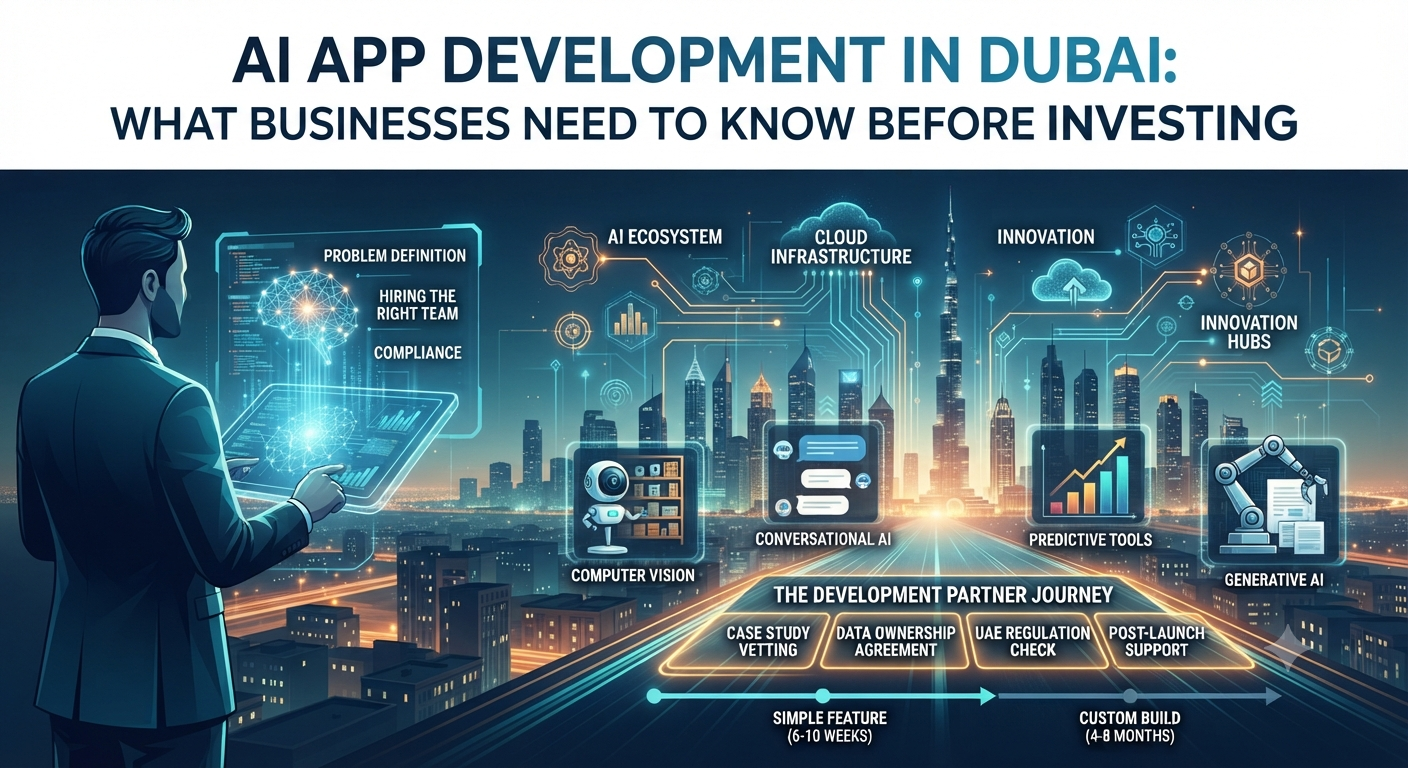
Some businesses need predictive tools, something that looks at historical data and forecasts demand, churn, or maintenance issues before they become expensive problems. Others need conversational AI, the chatbots and voice assistants that sit on top of large language models and get trained on your specific business knowledge. Some need computer vision, cameras that can spot an empty shelf, flag a safety violation on a construction site, or recognize a repeat customer walking through the door. Others want generative AI: tools that draft content, assist with design, or act as an internal assistant that actually knows your company’s documents. And a lot of the time, what a business really needs is quieter than all of that, AI simply embedded into existing software to handle small decisions automatically, like flagging a suspicious invoice before it gets paid.

The mistake I see most often is a business walking into a meeting and saying “we want an AI app” without knowing which of these they’re actually asking for. A developer worth working with should slow that conversation down. If someone starts quoting you a price before asking what outcome you’re actually trying to achieve, that’s worth noticing.

Why Dubai Is a Strong Market for This, With a Few Catches?

There’s a lot going for Dubai as a place to build AI products. With local or regional data centers operated by AWS, Azure, and Google Cloud, the cloud infrastructure is strong. This is important when considering the physical location of your data. AI engineers from India, Eastern Europe, and the Gulf have been drawn to the rapidly expanding talent pool. Additionally, there’s a good chance that government-backed initiatives can expedite approvals or ease your route if you work in fintech, logistics, or healthcare.

The catch is regulation, and it’s not a small one. The UAE’s data protection law takes privacy seriously, and depending on your sector, banking and healthcare especially, there are additional layers on top of that. Businesses coming from markets with looser data rules are often caught off guard by how much documentation, consent handling, and access control needs to be built in before an AI app can legally go live. That’s not a reason to hold off on Dubai. It’s a reason to build compliance into the project plan from week one instead of scrambling to patch it in right before launch.

There’s also a quieter trap worth mentioning: because Dubai markets itself so aggressively as an innovation hub, people sometimes assume that anyone offering AI development services here must genuinely know what they’re doing. That’s not always true. Plenty of agencies are doing perfectly ordinary app development and slapping “AI-powered” on the label because it sells better. Vetting matters here just as much as anywhere.

Where the Money Actually Goes (And Where Budgets Get Blown)

Everyone asks about cost first, understandably. A simple AI feature, a chatbot trained on your knowledge base, can start somewhere in the tens of thousands of dirhams. A custom computer vision system running in real time, or a predictive engine trained on your own proprietary data, can climb into the hundreds of thousands depending on how much data you’re working with and how complex the infrastructure needs to be.

But here’s the thing most people don’t expect: the AI model itself is rarely the expensive part. Most teams build on top of established models rather than inventing one from scratch. What actually eats the budget is everything around the model.

Your data readiness matters more than almost anything else. If your business information is scattered across five different systems, half-updated, or simply doesn’t exist in a usable form yet, a big chunk of your budget is going to go toward cleaning and organizing that before any real AI work can begin. Integration is another quiet cost driver, connecting the AI feature to your existing CRM, ERP, or point-of-sale system is often harder and more time-consuming than building the AI part itself. Then there’s ongoing maintenance, which people tend to forget entirely. AI models aren’t a “build it once and walk away” thing. They drift. Behavior changes. Data changes. Budget for retraining, or you’ll be paying for it later anyway, just with more frustration attached. And finally, compliance and security work, encryption, access logs, audit trails, adds real engineering hours that a lazy quote will often just leave out.

If a proposal looks suspiciously cheap, it’s worth asking directly what’s missing. Nine times out of ten, it’s data preparation or post-launch support that quietly got left off the page.

How to Actually Pick the Right Development Partner

This decision matters more than anything else in this article. Before you sign anything, I would really advise you to check a few things:

Ask for real case studies, not polished concepts. Anyone can put together a nice-looking mockup. Ask what actually changed after launch, fewer support tickets, faster lead response, less wasted inventory, and if you can, talk to a past client directly.

Find out who owns the data and the model once it’s built. Ideally, that’s you, not a vendor’s proprietary platform that quietly locks you in. Get this written down clearly before you sign.

Check whether they already understand UAE data regulations, or whether they’ll be learning the rules on your dime. A team that’s done this before will save you months.

Ask what happens six months after launch, not just what happens at launch. And be a little skeptical of vague answers. If someone can’t clearly tell you which model or approach they’re using and why it fits your specific problem, there’s a decent chance “AI” is doing more work in their marketing than in their product.

Timelines and Return on Investment, Realistically

A simple AI feature bolted onto an existing app can be live in six to ten weeks. A genuinely custom AI application, particularly one that needs training on your own data, more realistically takes four to eight months once you factor in data preparation, testing, and regulatory review. If someone promises you a sophisticated custom build in a few weeks, either the scope has been quietly simplified, or corners are being cut that you’ll notice later.

As for return on investment, the businesses that actually see results tend to be the ones who started small and specific, cutting response times, reducing manual data entry, catching fraud faster, rather than chasing a vague idea of “having AI.” Start narrow, prove it works, then expand. It’s a less exciting pitch than “let’s build the whole thing at once,” but it’s the one that tends to actually pay off.

Final Thoughts

The infrastructure is available, talent is developing quickly, and the regulatory framework, while strict, actually encourages companies to build things carefully rather than carelessly. AI app development in Dubai is a real opportunity, not just hype. It’s not always the fastest-moving businesses that succeed here. They are the ones who take the time to accurately describe the issue, make an honest budget for the less glamorous aspects like data and compliance, and select a partner who poses more challenging questions than they were able to address during the initial meeting.

The staff at Wantik Technologies is pleased to help you through the process if you’re considering an AI investment and want a clear, concise assessment of what’s feasible for your company in terms of cost, schedule, and technical approach. Get in touch with us for a consultation, and we’ll provide you with an accurate assessment of what this will truly entail for your company.

What Are the Typical Stages of a Custom Software Project Lifecycle?

What Are the Typical Stages of a Custom Software Project Lifecycle?

What Are the Typical Stages of a Custom Software Project Lifecycle?

You’ve decided off-the-shelf tools aren’t cutting it anymore, and you’re ready to talk to a custom software development company. Okay, but it’s important to understand what you’re really signing up for before you sign anything. A custom build goes through a predetermined series of steps, each with its own choices, risks, and checkpoints where things frequently go wrong. It is not a single deliverable that arrives in your inbox one day.

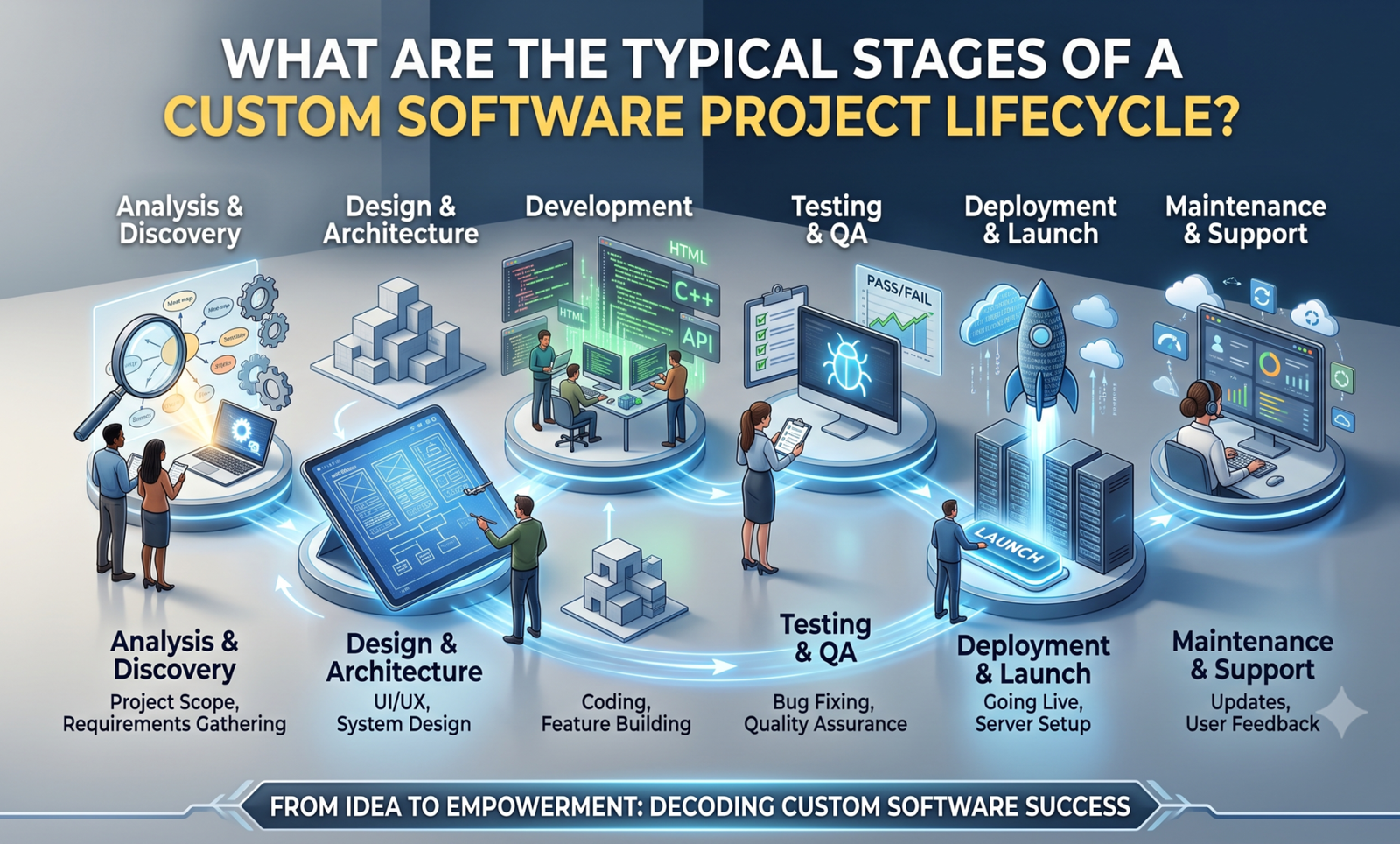
We’ve gone through this process enough times at Wantik Technologies to know where projects typically stall: unclear requirements, a hurried design phase to “save time,” or a launch that forgoes adequate testing due to an impending deadline. The seven steps that any custom software project actually goes through are described in this article, along with what to look out for at each level.

Stage 1: Discovery and Requirements Gathering

People are more tempted to hurry at this phase, which also decides whether or not everything proceeds as planned.

Discovery is more than just one meeting where you pitch your idea to a developer and get their approval. When done correctly, it entails multiple meetings with the real users of the program, not simply the executive who approved the budget.  A logistics company we worked with in Jebel Ali thought they needed a simple dispatch tracker; three discovery sessions later, it turned out the real bottleneck was how dispatchers reconciled fuel receipts against trip logs by hand. The program they ultimately developed was different from what they had first requested, and it resolved the issue that had really cost them money.

At this point, a capable team is enquiring:

    • What issue is this resolving, and how is it currently being addressed (using spreadsheets, a legacy system, or manual processes)?

    • Who are the real end users and how comfortable are they with technology?

    • Which current systems, your accounting program, a payment gateway, or a CRM, does this need to communicate with?

    • What distinguishes nice-to-haves from non-negotiables?

Instead of a verbal understanding, the outcome should be a written requirements document. It is worthwhile to enquire if a vendor wishes to proceed directly to a proposal without doing this.

Stage 2: Planning, Scoping, and Choosing an Approach

Once you know what you’re building, the next question is how, and how much it’ll cost and take.

This is where scope gets defined properly, usually broken into a minimum viable product (MVP) and a longer list of features for later phases. It’s tempting to want everything in version one, but a phased approach gets something usable in front of real users faster, and lets you course-correct before you’ve spent the full budget on features nobody ends up needing.

The development methodology is also settled at this stage. Instead of using a strict Waterfall model where nothing is visible until the very end, the majority of teams in modern custom software development companies operate in Agile sprints, working in two-to four-week cycles with frequent check-ins. Agile is more than just a catchphrase in this context; it implies you won’t have to wait four months to see if the final result is what you had in mind. A more organised Waterfall or hybrid approach may still be appropriate for projects with highly specific, well-defined objectives (certain compliance-driven systems, for example). How much the requirements are likely to change after actual users become engaged will determine the appropriate decision.

You should walk away from this stage with a project timeline, a cost estimate broken down by phase, and a clear list of what’s in the MVP versus what’s deferred.

Stage 3: UI/UX Design and Technical Architecture

Two things happen in parallel here, and both matter more than most clients expect.

Before creating a single line of production code, we develop wireframes, higher-fidelity prototypes, and test them with actual users. This insurance is less expensive than it might seem because it just takes a few days to rewrite a complicated workflow in a clickable prototype, but it takes weeks to do so once development is complete. This is also where local user expectations and multilingual interface requirements (Arabic and English, including right-to-left layout compatibility) are integrated from the beginning rather than added after the fact for any company operating in the United Arab Emirates.

Technically speaking, architects make the fundamental decisions that are difficult to undo later, such as which programming languages and frameworks are appropriate for the task, how the database is organised, whether it is built on-premises or in the cloud, and how it will expand if usage triples in the second year. This is also where security architecture and data protection regulations, such as UAE PDPL compliance, are incorporated, rather than added after a launch, for companies that handle consumer data.

One of the more costly errors we observe is skipping or hurrying this step. When the system needs to grow, and the underlying structure is unable to support it without an expensive rebuild, a weak architecture typically breaks the software eighteen months later.

Stage 4: Development

This is the stage most people picture when they think of “building software”, and it’s usually the longest one, though not necessarily the riskiest, if the earlier stages were done properly.

Developers work through the sprint cycles defined in planning, building features incrementally rather than disappearing for months and reappearing with a finished product. You should be seeing working increments regularly: a functioning login flow, then a working dashboard, then integrated reporting, not just status updates in a meeting. This regular visibility is what actually lets you catch a misunderstanding early, while it’s a small fix, instead of at the end, when it’s a rebuild.

Good practice here also includes code reviews, version control, and documentation as the product is built, not retrofitted at the end because a client asked for it. If you ever need to bring in a different developer or team later, undocumented code makes that far more expensive than it needs to be.

Stage 5: Testing and Quality Assurance

Testing isn’t a single pass at the end, it should be happening throughout development, but it intensifies into its own dedicated phase before launch.

This typically covers several layers: functional testing (does each feature do what it’s supposed to), integration testing (do the pieces work together, your new system talking to your existing payment processor or accounting platform, for example), performance testing (does it hold up under real load, not just a demo with three users), security testing, and finally user acceptance testing (UAT), where the actual people who’ll use the software daily try to break it before it goes live.

UAT is the step that gets compressed most often when timelines slip, and it’s the one that shouldn’t be. A bug caught by your QA team costs a fix. The same bug caught by a customer after launch costs a fix, an apology, and sometimes a lost customer.

Stage 6: Deployment and Go-Live

Launch day looks simple from the outside, the software goes live, but there’s real groundwork behind it: setting up production infrastructure, migrating existing data without losing or corrupting it, configuring backups, and often running a soft launch with a small user group before a full rollout.

If you’re replacing an existing system, data migration needs special consideration. Accurately transferring years’ worth of customer records, transaction history, or inventory data is often underestimated in terms of both time and complexity. One of the most frequent reasons for a difficult launch week is a hurried relocation.

Stage 7: Post-Launch Support, Maintenance, and Growth

Here’s what a lot of first-time buyers get wrong: they treat launch as the finish line. It isn’t. It’s closer to the starting line for the software’s actual working life.

Once real users are in the system, you’ll get feedback that no amount of discovery work could have predicted, plus bugs that only surface under real-world conditions. There are security patches to apply, operating system and dependency updates to keep pace with, and, if the software is doing its job, new feature requests as your business grows and the software needs to grow with it.

This is also the point at which picking an experienced partner truly pays off. A team that built your system and is familiar with its architecture can resolve problems and deliver improvements far more quickly than someone who is just viewing your codebase for the first time. Rather than re-tendering the work every time something needs to be updated, it’s one of the more obvious reasons why companies typically keep with the same development partner throughout the software’s lifetime.

Conclusion

A custom software project goes through several stages, including discovery, planning, design and architecture, development, testing, deployment, and ongoing support. If any of these steps are skipped or rushed, it usually results in costs later on, such as a missed requirement, a security flaw, or a system that isn’t scalable when you need it to.

When assessing a custom software development company in Dubai for a future project, find out exactly how they manage each of these phases, not just what they’ll create, but how they’ll get there. Because software that truly fits your business requires more than just good code, it requires a methodology designed to identify issues before they become costly ones, we at Wantik Technologies guide each client through this process from the initial discovery meeting to long beyond launch.

Are you considering a custom software project and would like a better idea of its scope and cost before committing? Get in contact with the Wantik Technologies team for a straightforward discussion about what your project will truly entail. There is no commitment.

Related Reading: Custom Web Application Development Company vs. Off-the-Shelf Templates: The Scalability Debate

How to Structure E-Commerce Sites for AI Crawlers

How to Structure E-Commerce Websites for AI Crawlers?  

How to Structure E-Commerce Sites for AI Crawlers

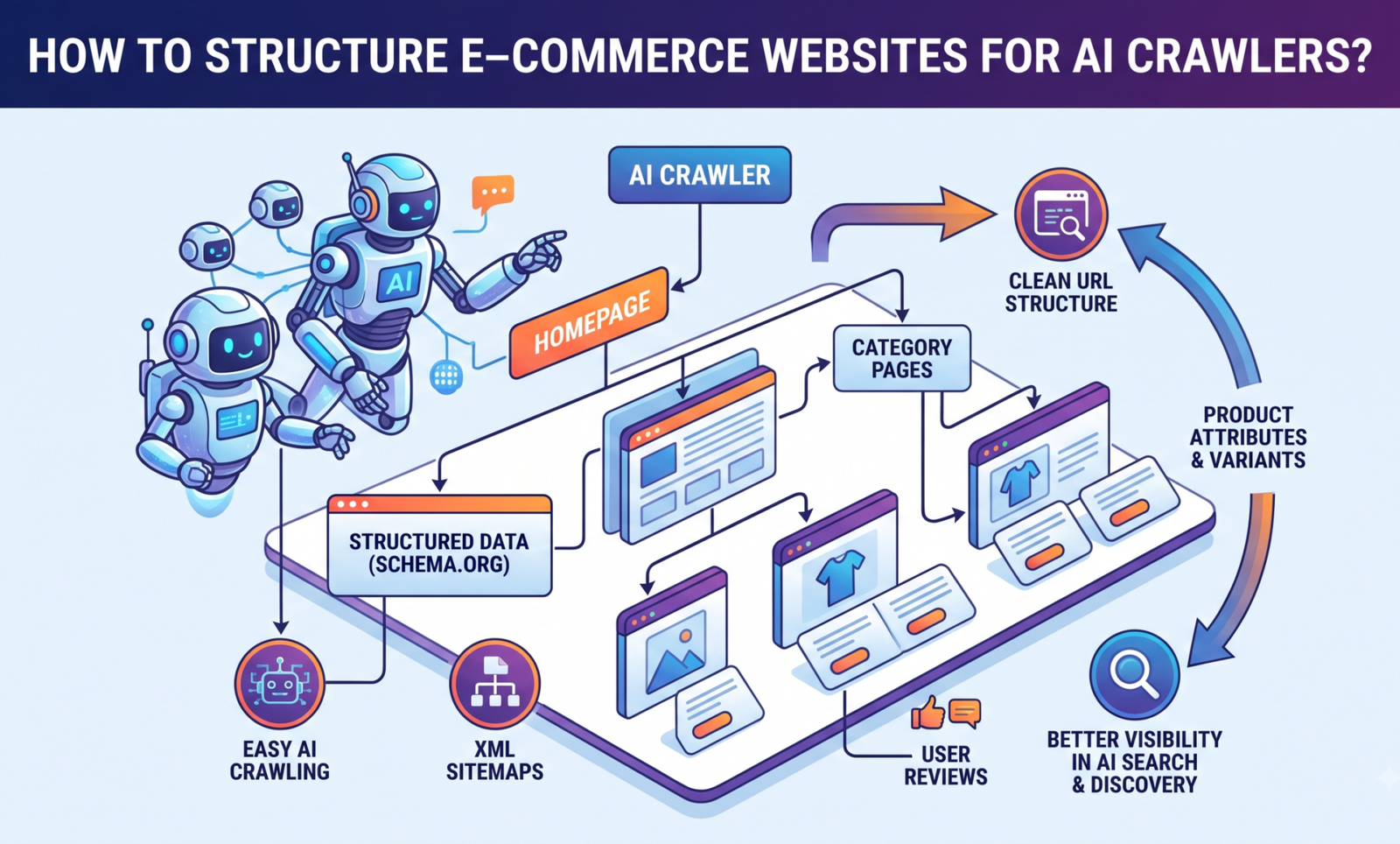
Try this: ask Perplexity or ChatGPT to suggest a decent pair of running shoes for less than $100, and observe how many of the retailers you actually visit appear. There are not many. When an AI tool answers a search instead of a search results page, your product pages may appear prominently in Google rankings but remain completely unseen. Many store owners have yet to come to terms with this difficult reality. The simple explanation of why: Instead of the JavaScript-heavy, image-first layouts that are the foundation of most online retailers, AI crawlers require clear, plain-text, server-rendered content and structured data that they can actually read. If you want your catalog to show up when AI tools answer shopping questions, this is what needs to change, and it starts at the code level, not the copywriting level.

Why AI Crawlers Don’t See Your Site the Way Google Does

For many years, “SEO” essentially meant making Googlebot happy. Additionally, Googlebot has become rather adept at handling messy websites; it renders JavaScript, is patient, and has decades of infrastructure built to understand a page’s meaning even when the code is a little messy.

AI crawlers may have different crawling and rendering constraints than traditional search crawlers. To feed a language model that requires hard information quickly, such as pricing, stock status, specs, return policy, and customer reviews, bots such as GPTBot, ClaudeBot, and PerplexityBot are gathering content. The bot doesn’t wait around if that information appears only after three API calls have finished loading inside a React component. It either ignores the page or uses whatever fragments it was able to obtain, neither of which is beneficial to you.

Another issue that most people overlook is timing. Compared to Google, AI crawlers often have shorter timeouts. Google may finally index a page that takes a few more seconds to fully render because everything is loading client-side, but an AI bot that scans thousands of pages every hour won’t stay for it. To be honest, this is most likely the main cause of a well-ranked store performing worse than anticipated in AI-generated responses. The content that matters is literally never seen by the crawler.

Get the Technical Foundation Right First

Although it’s the less glamorous aspect, this is where the true difference is formed.

Don’t approach organised data as optional; instead, start with it. Product, Offer, AggregateRating, Review, and BreadcrumbList must all have the appropriate Schema.org markup in JSON-LD. It used to be “nice for SEO” stuff. These days, it’s arguably the simplest method to give an AI system precise information, such as price, currency, availability, brand, SKU, and rating, without having it make assumptions based on text that is close by.

Additionally, server-side rendering is far more important now than it was. A significant portion of AI crawlers won’t see your prices or product listings if they only show up once JavaScript takes over and retrieves data client-side. The product name, price, and description are included in the raw HTML as soon as the page loads, before a single script is executed, thanks to server-side rendering, also known as static generation. One of the first things we look for when clients come to us for e-commerce website development services is whether the first bit of HTML that loads has the important information or if it’s just an empty shell waiting for JavaScript to fill it in.

URL structure counts too, more than people expect. Something like /category/subcategory/product-name tells both a human and a machine something about hierarchy and context. URLs that are just tracking parameters and long numeric IDs strip that signal away completely.

Additionally, go read your robots.txt file. As a basic security step, many websites have general rules that prevent “unknown” bots, which may end up blocking GPTBot or ClaudeBot in addition to the scrapers you were originally attempting to stop. If you care about AI visibility, choose carefully which bots to allow through rather than automatically blocking them all.

Structure Your Content So an AI Model Can Actually Use It

It takes more than just getting the crawler to the page. The actual material must be arranged so that it flows naturally into a response.

Make use of actual headings, such as an H1 for the product name and H2s for sections such as “Features,” “Specifications,” “Shipping & Returns,” and “Customer Reviews.” An actual heading tag, not bold text that has been formatted to resemble a heading. For a crawler, the structure functions similarly to a map. If you remove it and replace it with styled <div>s, the crawler is left to guess at the structure of your page based only on layout, which is, to be honest, not great.

Compose descriptions that make a point. “Premium quality, best in class, a must-have” conveys exactly nothing to an AI model or a consumer. What kind of material is it? What are the measurements? Are iOS and Android chargers compatible with it? Is it able to support 15 kg? In addition to being better copy, these details provide a model with something tangible to work from when constructing an answer. Turns out writing for machines and writing well for people converge more than you’d think.

Include FAQs that are actually helpful. Because question-and-answer format material matches almost exactly how individuals formulate their enquiries in the first place, AI systems significantly rely on it. The simple two-sentence response to the question, “Does this blender handle frozen fruit?” does more work than you may anticipate.

Additionally, don’t conceal the crucial information behind a click. Reviews that only show up after an endless scroll trigger and specs placed behind a tab that loads only upon interaction—many crawlers never mimic that kind of interaction, so to them, the content might as well not exist. Price, size, materials, and return policy are examples of important information that should be on the static page rather than behind an interaction.

The Mistakes That Quietly Sink Stores

A handful of patterns come up again and again when we audit sites, and they’re worth naming directly:

    • Infinite scroll with no pagination fallback. Feels great to use, but most crawlers never trigger a scroll event, so pair it with a paginated URL option like ?page=2 so the whole catalog stays reachable.

    • Pricing loaded only through a third-party widget or a currency script. If the price only shows up after a script fetches a live exchange rate, plenty of bots see no price at all.

    • A pile of near-duplicate pages for every color and size variant with no canonical tag pointing to the “real” one, confusing for search engines, and just as confusing for an AI trying to figure out which page is authoritative.

    • Thin or missing brand information. No clear About page, no visible return policy, nothing that reads as a real, accountable business, this quietly hurts trust signals, and AI systems increasingly weigh source credibility when deciding what to recommend.

    • Spec sheets that are actually just images. A beautifully designed .jpg table of dimensions looks great to a human and is completely unreadable to a crawler.

None of these are unusual or rare mistakes. They’re the natural result of building for conversions and visual polish first, which made total sense five or six years ago, back when “machine-readable” wasn’t really part of the conversation. It’s part of the conversation now.

FAQs

Do I need to redesign my whole website to be AI-crawler friendly?

Not necessarily. Most of this is fixable without touching your design, it’s about how content is rendered and marked up underneath it, not how it looks. A site can keep its exact look and feel and still move from invisible to fully readable once the rendering and schema are sorted out.

Will optimizing for AI crawlers hurt my regular Google SEO?

No, if anything, it usually helps. Server-side rendering, clean semantic HTML, and proper structured data are things Google has rewarded for years. You’re not choosing between the two; the changes largely overlap.

How do I know if AI bots are even visiting my site right now?

Check your server logs for user agents like GPTBot, ClaudeBot, PerplexityBot, or Google-Extended. If you’re not seeing them at all, that’s often a robots.txt or firewall issue worth investigating before anything else.

Does this only matter for large stores with thousands of products?

No, smaller catalogs actually have an easier time fixing this properly, since there’s less to audit and rebuild. The principles are the same whether you’ve got 20 SKUs or 20,000.

How long does it usually take to see a difference?

It can take weeks for traditional SEO crawling and re-indexing. The truth is that it depends on how frequently the particular tool re-crawls and how competitive your product category is, but AI-driven response engines may update their sources more quickly.

Conclusion

Alongside traditional search, AI crawlers are already influencing how consumers locate and assess things, so they are no longer a peripheral, future issue. Organising your store for them is a part of both good SEO and good user experience. Clean semantic HTML, server-rendered content that doesn’t conceal itself behind JavaScript, precise structured data, and product writing that genuinely addresses the subject rather than filling the page with adjectives are all examples of the same discipline applied with greater caution.

There’s a good probability you’re now losing visibility without realising it if your store was constructed quickly or a few years ago. This is precisely the type of audit-and-rebuild work that Wantik Technologies’ e-commerce website development service does, ensuring that your catalogue is truly readable by both humans and machines without sacrificing the speed and design that your consumers truly value. It’s an excellent place to start if you’re unsure of your store’s current position on any of them. Get in touch with us, and we’ll walk you through the specifics of an AI-ready structure for your catalogue.

Read More: https://www.wantiktechnologies.com/how-to-optimize-your-ecommerce-store-for-ai-search-engines-geo/

Best AI SEO Tool for Geo-Optimization for E-Commerce Sites

What Is the Best AI SEO Tool for Geo-Optimization for E-Commerce Sites?

Best AI SEO Tool for Geo-Optimization for E-Commerce Sites

Having excellent products is not the only aspect of running an online store these days. It’s about ensuring that clients can locate them. SEO services are now crucial for helping online companies show up in front of the right audience at the right time, whether you’re selling in a single city or across multiple countries. Businesses now have access to technology that can automate research, find possibilities, and increase exposure in location-based search thanks to AI-powered SEO solutions that are getting smarter every year.

So, which AI tool handle best for e-commerce sites?

The quick answer is that there isn’t a single, all-purpose “best” tool. Semrush, Ahrefs, Surfer SEO, BrightLocal, and Clearscope are a few examples of platforms that are excellent in various domains. Your target markets, SEO approach, and business objectives will determine the best option. More significantly, when AI solutions are directed by seasoned SEO experts rather than being left to operate automatically, they produce the best outcomes.

Let’s examine how AI is changing geo-optimization and which technologies actually have an impact.

Why Geo-Optimization Matters for E-Commerce SEO

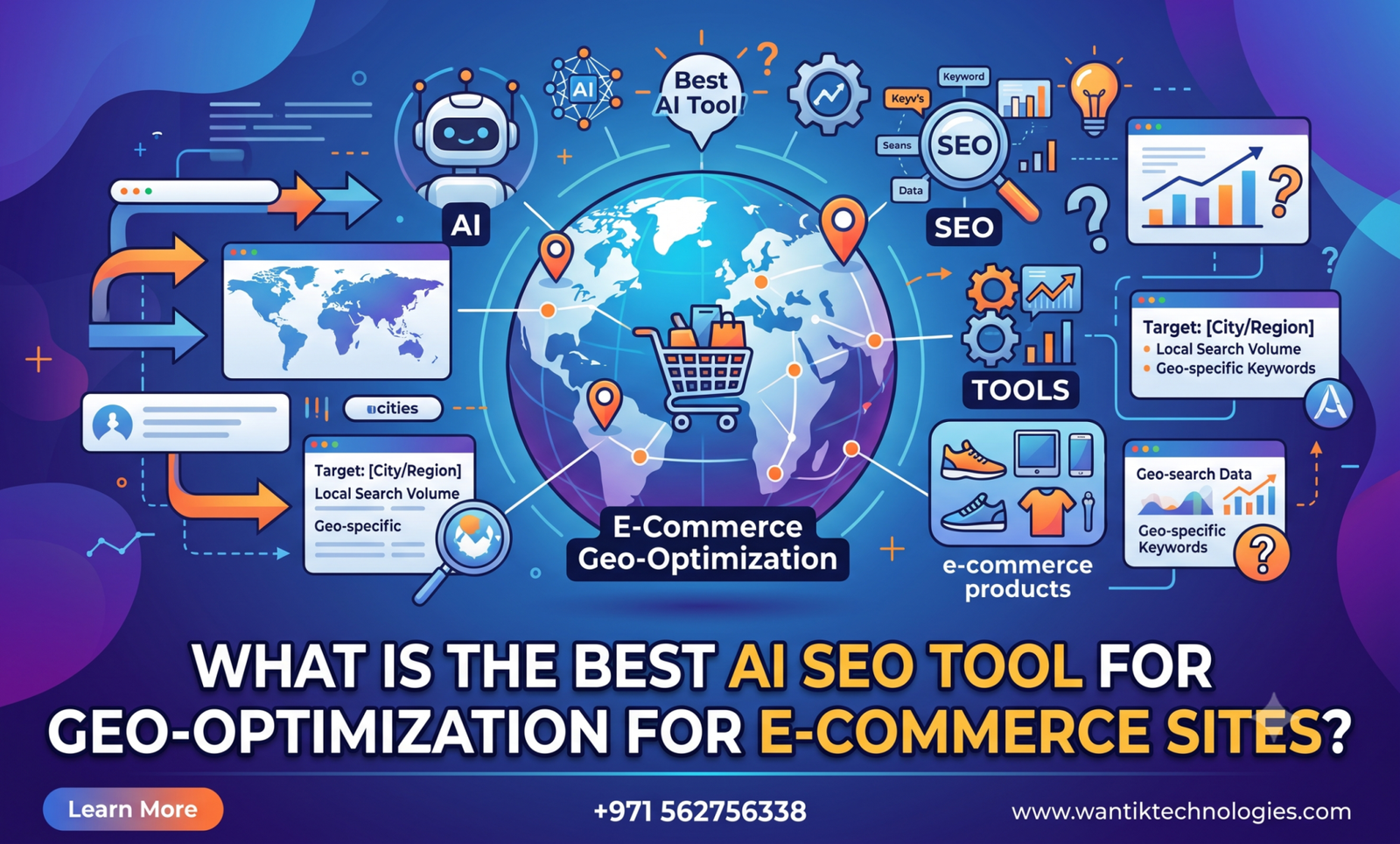
A common misconception is that local SEO is only crucial for physical establishments. In reality, e-commerce performance also heavily depends on geo-optimization. The personalisation of search engines has increased. Search results are personalized down to the city level now — someone searching “running shoes” in Dubai isn’t seeing the same results as someone searching it in Singapore or London, even for identical products.

When ranking websites, Google’s algorithms take into account regional preferences, language, location, and search intent. This presents both opportunities and difficulties for e-commerce companies. When your website is appropriately tailored for various geographical markets, you can:


    • Position for region-specific searches

    • Boost exposure in local search results

    • Boost qualified traffic

    • Provide various audiences with localised material.

    • Increase conversion rates by using pertinent experiences

Let’s say you have an international skincare product business.

While consumers in the UK could look up “SPF for sensitive skin,” those in the UAE might look up “best sunscreen for Dubai heat.”

Despite the fact that both clients desire sunscreen, their search goals differ. Businesses may recognise these differences and produce content that organically appeals to each group with the use of AI-powered SEO solutions.

This is where adding city names to your webpages is just one aspect of geo-optimization. Understanding user intent, regional language, seasonal trends, and local competition are the main goals of modern SEO.

How AI Has Changed Modern SEO

Hours of manual keyword research, competitive analysis, and content optimisation were all part of traditional SEO.

That workload has been decreased thanks to AI. Thousands of keywords may be analysed in a matter of minutes by today’s AI-powered SEO solutions, which can also find ranking opportunities, spot technical problems, and even suggest changes based on search intent.

AI does not, however, take the place of SEO knowledge.  Rather, it serves as an intelligent assistant that facilitates quicker and better decision-making for marketers.

The main benefits consist of:


    • Quicker keyword research

    • Improved optimisation of content

    • Enhanced analysis of competitors

    • Automated technical audits

    • More intelligent suggestions for internal connection

    • Finding local search opportunities

    • Analysis of predictive trends

SEO experts may concentrate on developing methods that genuinely lead to business success rather than spending days collecting data.

The Best AI SEO Tools for Geo-Optimization

No single platform dominates every aspect of geo-optimization. Each tool has its strengths.


Semrush

One of the most complete AI-powered SEO platforms on the market is still Semrush.

It offers:


    • Local keyword research

    • Position tracking by location

    • Competitor analysis

    • AI-assisted content recommendations

    • Technical SEO audits

    • Backlink analysis

Semrush offers a great combination of research, monitoring, and reporting for e-commerce companies that target several cities or nations.

It is particularly helpful for entering new markets because it assists in identifying keyword opportunities that vary by geographical location.

Ahrefs

Ahrefs is especially useful for competitive research. Its database allows businesses to discover:


    • Competitor rankings

    • Regional keyword opportunities

    • Backlink profiles

    • Content gaps

    • Organic traffic estimates

Ahrefs can show you exactly what top-performing competitors are doing in each area if you’re venturing into a competitive e-commerce segment.

Surfer SEO

Surfer SEO combines AI with content optimization. Instead of just recommending keywords, it examines pages that score highly and makes recommendations for enhancements based on actual search results. Surfer SEO assists authors in producing thorough and organically optimised content for geo-targeted landing pages.

This is particularly useful for localised landing pages, product collections, and category sites.

BrightLocal

Local SEO is BrightLocal’s area of expertise. Despite being frequently linked to companies with physical locations, it also benefits e-commerce brands in the following ways:


    • Local rankings

    • Google Business Profile insights

    • Citation tracking

    • Local reputation monitoring

    • Geo-specific performance reporting

Brands that combine online sales with physical stores benefit significantly from BrightLocal’s location-focused features.

Clearscope

One of Google’s most powerful ranking indicators is content quality. AI is used by Clearscope to assess how thoroughly your content addresses a subject. It emphasises topical relevance and semantic coverage rather than promoting keyword repetition.

Clearscope aids in creating genuinely helpful resources that enable consumers and search engines for e-commerce websites publishing buying advice, product comparisons, and instructional content.

AI Is Powerful, But Strategy Still Wins

A common misconception is that rankings may be raised solely by AI software. In reality, the effectiveness of AI depends on the approach used.

An AI tool would suggest, for instance, focusing on “wireless headphones Dubai.”

But should you create:


    • A category page?

    • A buying guide?

    • A comparison article?

    • A city landing page?

    • Product-specific content?

Understanding user purpose, corporate objectives, competition, and customer behaviour is necessary to make that choice. For this reason, effective SEO blends human knowledge with technology.

Websites that exhibit experience, knowledge, authority, and reliability, rather than just those utilising AI, are rewarded by Google’s Helpful Content system. Because AI is unable to fully comprehend consumer psychology, brand positioning, or purchase behaviour, businesses that solely rely on automated content frequently face difficulties.

How to Choose the Right AI SEO Tool

Rather than asking which tool is “best,” ask which one solves your biggest problem. If your priority is:

Competitor research: Ahrefs

Complete SEO management: Semrush

Content optimization: Surfer SEO or Clearscope

Local visibility: BrightLocal

Since each platform covers a distinct gap, many successful firms actually use many platforms in combination. When evaluating AI SEO software, consider:


    • Accuracy of keyword data

    • Local search capabilities

    • Technical SEO features

    • Reporting quality

    • Ease of use

    • Integration with existing marketing tools

    • Scalability as your business grows

Remember that software should support your SEO strategy, not replace it.

Why Human Expertise Still Carries the Weight

AI is good at finding opportunities. Turning those into actual results still takes people. Search engines keep leaning further into rewarding genuine expertise and useful content, which is part of why businesses working with experienced SEO specialists tend to outperform the ones relying purely on automation.

A solid SEO team brings things software can’t:


    • Develop a long-term strategy

    • Understand customer intent

    • Create genuinely helpful content

    • Topical authority built over time

    • Optimize technical performance

    • Improve user experience

    • Fast adaptation when Google shifts its algorithm

This matters even more if you’re expanding into multiple markets — the margin for guessing wrong gets more expensive. Working with an experienced agency, or the right SEO consultant, means AI’s suggestions get filtered through actual strategy instead of applied blindly.

The Future of AI and Geo-Optimization

AI will continue transforming SEO over the coming years. We’re already seeing advancements in:


    • Predictive search analysis

    • AI-generated search insights

    • Personalized search experiences

    • Voice search optimization

    • Visual search

    • Automated content recommendations

Google’s primary goal hasn’t changed, though. For each search, It aims show people the most relevant, trustworthy, useful result for their search. Businesses that use AI as a tool — not a shortcut — while still prioritizing real user experience and solid content are the ones set up to last.

FAQ

1. What is the best AI SEO tool for geo-optimization?

There isn’t one tool that’s ideal for everyone. Ahrefs, Surfer SEO, and Semrush are all strong options depending on your goals — pairing AI tools with real SEO expertise tends to get the best results.

2. Can AI replace an SEO expert?

No. AI can expedite analysis and research, but it cannot take the role of experience or strategy. For this reason, a lot of companies still decide to collaborate with trustworthy SEO firms or the best SEO consultant in Dubai.

3. Is geo-optimization important for e-commerce websites?

Yes. Geo-optimization helps your website show up in location-specific searches and attract the appropriate audience if you sell in many cities or regions.

4. How long does SEO take to show results?

It varies by site, but most businesses running consistent SEO work start seeing movement within three to six months.

5. Should I use an AI SEO tool or hire an SEO agency?

Both, ideally. AI tools are great at surfacing opportunities — an agency is what turns those opportunities into an actual strategy that holds up long term.

Conclusion

Geo-optimization is now faster, smarter, and more data-driven than ever thanks to AI-powered SEO tools. Semrush, Ahrefs, Surfer SEO, BrightLocal, and Clearscope each bring something real to the table. But none of them replace a strategy built around what your customers actually need.

The e-commerce brands seeing the best results are the ones combining smart AI tools with people who understand growth, technical SEO, content quality, and search intent — because that combination is what actually sticks.

If you’re looking to grow your store with sharper, more data-driven SEO services. At Wantik Technologies,We provide customised strategies that increase exposure, draw in qualified traffic, and support your company’s expansion in the most important areas, from technical SEO and content strategy to geo-optimization and AI-powered search analytics.

Top AI App Development Services Available in the UAE

Here’s something nobody tells you before you start shopping for an AI development partner: almost every agency in Dubai will tell you they “do AI.” Half of them mean they can bolt a `chatbot onto your existing app. The other half genuinely build models trained on your data. Figuring out which is which, before you sign anything, is the whole game.

So let’s get right to it. In summary, the market for AI app development in UAE is more developed than it appears from the outside. Real teams, such as those at companies like Wantik Technologies, are creating truly unique AI products for regional companies rather than merely reselling an API wrapper with a lovely user interface. The secret is to know what to ask before committing to a budget because, in most cases, the difference between an excellent and mediocre partner doesn’t become apparent until the fourth month.

This blog explains what AI app development really entails in practice, why the UAE has developed into a respectable location for this kind of project, and how to distinguish between a serious team and one that is just riding the buzz.

What People Actually Mean by “AI App Development”

These days, the term is used to refer to nearly everything, so let’s be clear about that first.

When someone in the UAE says they need an AI app developed, they typically mean one of the following:

    • An assistant or chatbot integrated into an existing app.

    • A predictive tool that makes predictions based on historical data.

    • Computer vision, for tasks like warehouse logistics and retail shelf monitoring.

    • An engine that makes recommendations for things you might like to watch or purchase.

    • Features of generative AI, such as document summarisation and content creation.

    • A complete AI platform designed with an organization’s own data in mind.

Before proposing, a team that truly knows what it’s doing will find out which of these best suits your circumstances. You should continue searching if a salesperson says, “We’ll just plug in ChatGPT,” without even enquiring about your data or users. That isn’t progress. A reseller with a slide deck is that.

Why the UAE Has Quietly Become a Good Place to Build This

This was not an accident, nor did it happen overnight. The UAE’s National AI Strategy forced several public sector projects to be abandoned, which led to a pool of engineers who had to develop and deliver AI features under actual deadlines rather than just in a sandbox.

This is important if you’re hiring locally for a couple of reasons:

    • Teams here have worked on government, healthcare, banking, and retail initiatives, so they’ve seen more than just the demo version of AI, they’ve seen its messy, regulated side.

    • Local staff typically already understand the region’s data residency regulations, which are taken seriously.

    • There is a fair amount of time zone overlap between Europe and Asia, which is helpful when you require continuous assistance rather than just a launch.

    • Several companies, including Wantik Technologies, retain AI engineering in-house rather than contracting it out to a subcontractor once “real” development begins.

It’s worth taking a moment to consider that final one. Many companies develop the software themselves, then covertly contract out the machine learning component to another party. It is precisely at that handoff that things go wrong: deadlines are missed, no one takes responsibility for the defects, and you wind up pursuing two vendors rather than just one.

How to Actually Evaluate a Partner (Not Just Their Pitch)

Once you’ve got a shortlist, don’t get pulled in by the deck. Ask a few blunt questions instead.

What’s actually running under the hood?

Are they integrating third-party APIs, refining an already existing large language model, or training their own models? On their own, none of these are incorrect, but the response reveals a lot about the price, who will eventually hold your data, and the extent of your future customisation options.

Who’s watching the model after launch?

This one is frequently overlooked. Artificial intelligence models stray. When user behaviour changes over the next few months, a model that functions flawlessly on launch day may subtly deteriorate. Find out how much it costs and who is in charge of catching that.

Where does your data actually live?

Particularly relevant here, given how strict UAE regulations are for banking, healthcare, and government work. A partner worth hiring will walk you through storage, access, and whether your data is being reused to train anything else.

Can they show you something real?

Case studies that claim to have “improved efficiency by 40” without explaining are of very low value. Get details on the app, including what it does, what data it uses, and what changed since it was released. Instead of showing you a slide with a fictitious percentage on it, if they are confident, they will show you a functional demo.

Does your project even need what they’re selling?

A custom-trained model is not necessary for everything. Developing diagnostic support for a clinic is entirely different from making product recommendations based on browsing behaviour. An agency has most likely not adequately scoped either one if they provide the same approximate pricing for both.

Where Wantik Technologies Fits In

Wantik Technologies works in the majority of this range; at times, it’s a fully AI-native product created from start, and at other times it’s a single AI feature carefully added to an already functional software. It’s usually the discovery stage rather than the technology itself that stands out. The team determines what data is truly available, what a model actually requires to be helpful, and how much it will cost to maintain in the future before writing a single line of code.

It may not seem important, but being honest up front is crucial. Many AI initiatives create an impressive demo that silently collapses when messy real-world data and actual users appear. The main cost difference is typically found in the space between “looks good in the demo” and “actually holds up in production” for businesses in the UAE comparing a custom AI build to something templated off the shelf.

Mistakes Businesses Keep Making With AI Projects

A handful of patterns show up over and over in delayed or failed AI builds in this region:

    • Picking an agency on price alone, without checking if they’ve actually worked on AI before.

    • Skipping a proper data audit before agreeing on a timeline.

    • Treating an AI feature as “done” once it launches, instead of something that needs upkeep.

    • Underestimating how much compliance work regulated industries actually require.

    • Never nailing down, in writing, who owns the trained model and the data behind it.

None of this is complicated to avoid. It just means asking the uncomfortable questions before the contract is signed, not after.

Conclusion

Choosing the best partner for AI app development in the UAE really comes down to this: look for a team that can demonstrate something tangible, explain what they’re doing in simple terms, and stick around after launch rather than leaving once the invoice clears. This market has developed to the point where you shouldn’t have to take a chance on an unreliable vendor.

The most beneficial thing you can do if you’re actually developing an AI app is to have a comprehensive scoping conversation before any development begins. This talk should encompass your data, your users, and what success actually looks like six months from now. Get a straight response from Wantik Technologies on the requirements of your project.

Frequently Asked Questions

How much does AI app development cost in the UAE?

It depends heavily on scope. A custom-trained model with continuous support costs much more than a basic chatbot integration, which might begin in the low tens of thousands of dirhams. Any figure you hear before a formal scoping call should be treated as an estimate rather than a price.

How long does it actually take to build an AI app?

It can take two to four months to add a single AI function to an existing app. A complete AI-native solution typically takes six to twelve months, including data preparation and model training.

Do I need my own data to build an AI app?

Not necessarily. Certain functionalities are compatible with pre-trained models or third-party APIs. However, your personal data is crucial if you want the app to accurately represent your company and your clients.

Is my data actually safe with a UAE-based AI company?

That ultimately depends on the vendor’s policies rather than where they are located. Enquire directly about who has access to the data, where it is kept, and whether it is used to develop models for different clients.

Can I add AI to an app I already have, or do I need to rebuild it?

Most of the time, you can add AI features without a full rebuild, as long as the existing architecture can handle the extra data processing. A technical audit will tell you for sure before you commit to anything.